Canada Passport 2026
Canada Passport photo requirements: 5 × 7cm, white background, head height 3.1-3.6cm.
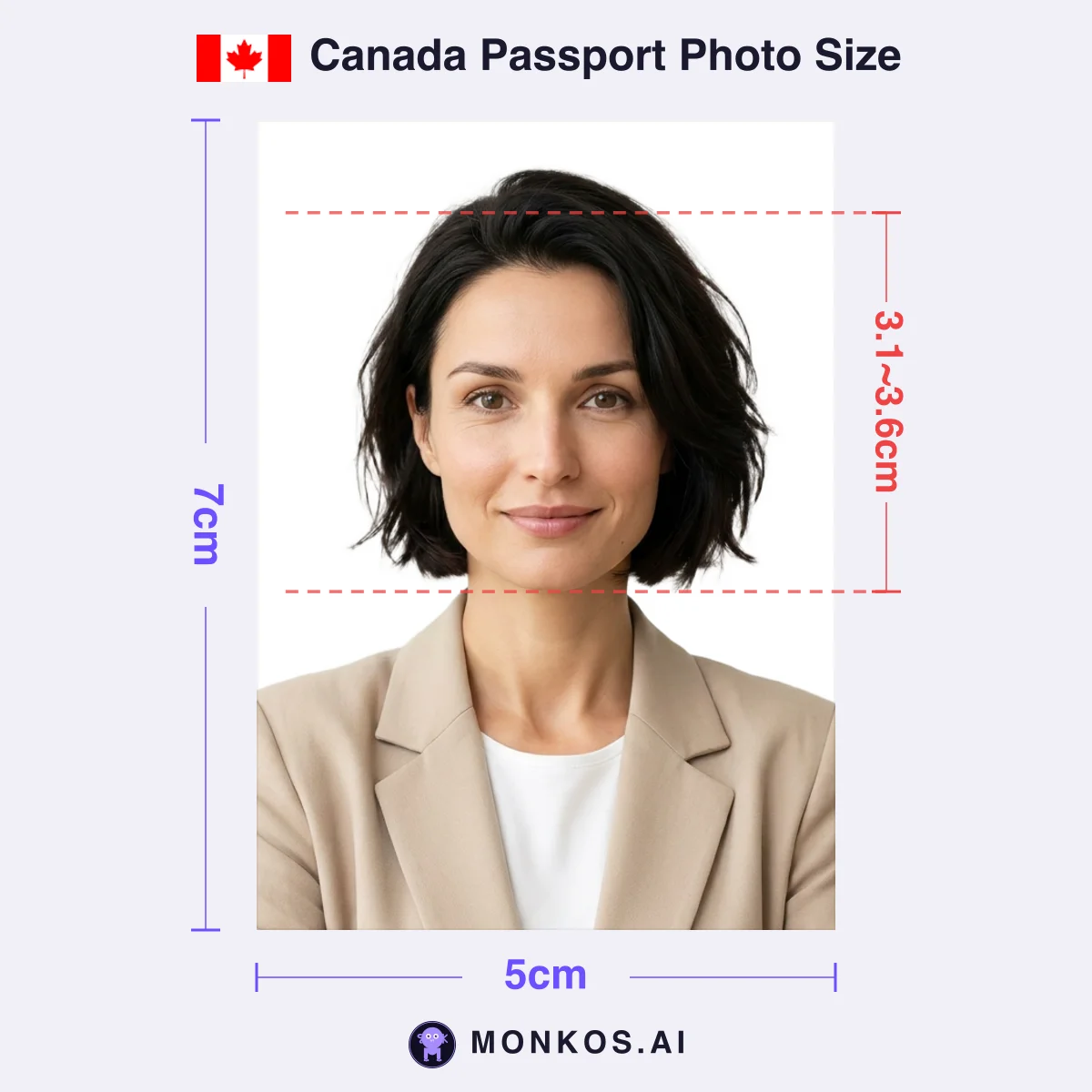
| Size | 5 × 7cm |
|---|---|
| Resolution | 590 × 826px |
| DPI | 300 or higher |
| Background | White |
| Head Height | 3.1-3.6cmRequired |
| Validity | Taken within the last 6 months |
| File Spec | Online renewal: JPEG/JPG, 1,800–4,500 (H) × 1,200–3,000 (W) pixels (3:2), 200KB–5MB, straight from the camera |
- 50 × 70 mm, plain white or light-coloured background, facing the camera, neutral expression, taken within the last 6 months
- ⚠️ Canada accepts only photos taken in person by a commercial photographer — for **both** paper applications and online renewals
- Photos touched by editing software, filters or AI tools (including background replacement, cropping around the head and shoulders, and brightness or colour correction) will get the application refused
- Paper applications need the studio name, address and date on the back of the photo (new applications also need a guarantor signature); online renewals ask for the same details at upload
Restrictions
- Clothing
- Avoid wearing white clothing
- Expression
- Neutral expression, no smiling or frowning, mouth closed
- Glasses
- Non-tinted prescription glasses allowed if eyes are clearly visible and frame does not cover any part of eyes; sunglasses not acceptable
- Face
- Full front view of head; face in middle of photograph; hair must be off face so edges of face are visible; eyes clearly visible with no glare on lenses
- Headwear
- Head coverings allowed for religious reasons if full facial features are not obscured; medical headwear permitted with explanatory letter
- Signs of editing, filters or heavy retouching (background swap, cropping, colour correction)
- Not taken in person by a commercial photographer (applies to paper and online renewal alike)
- White clothing blending into the background, blurring the edge of the face
- Not 50 × 70 mm, or face height outside 31–36 mm
- Printed at home or on heavyweight paper, or a scan of a printed photo
Documents Accepting the Same Photo
1
50 × 70 mm: One of the World's Largest Passport Photo Formats, Used Only by Canada
Canadian passport photos must measure 50 mm wide by 70 mm high (2 in × 2¾ in) with a chin-to-crown face height of 31–36 mm — a format unique to Canada that is incompatible with both the 35 × 45 mm size used by most countries and the US 2 × 2 inch standard.
At 50 × 70 mm, Canada uses one of the largest passport photo formats in the world. You cannot trim a US 2 × 2 inch (51 × 51 mm) photo or a 35 × 45 mm photo down to fit: both the 5:7 canvas ratio and the 31–36 mm face-height requirement differ, so no crop will make a foreign-format photo compliant. Immigration, Refugees and Citizenship Canada (IRCC) states up front that Canadian requirements differ from other countries' and warns that applications with non-compliant photos will be refused.
The same 50 × 70 mm dimensions and 31–36 mm face height also apply to paper applications for the permanent resident (PR) card and proof of citizenship — but the surrounding rules diverge by document. Passport photos may be colour or black and white and must be taken within 6 months; proof-of-citizenship photos must be colour; PR photos are accepted up to 12 months after they were taken. Meanwhile Canada's own visitor visa (TRV) uses a completely different 35 × 45 mm size, so 'everything Canadian is 50 × 70' is a myth.
Canada is also one of the few countries that officially accepts black-and-white passport photos. The background must be plain white or light-coloured with no texture, and white clothing should be avoided because it blends into the background — a stated rejection trigger.
The Back of the Photo: Canada's Double Authentication — Studio Stamp Plus Guarantor Signature
For a new Canadian passport application, the back of one of the two identical photos must carry the photo studio's name, complete address and the date the photo was taken (handwritten or stamped by the photographer), plus the guarantor's handwritten declaration 'I certify this to be a true likeness of (the applicant's name)' and signature.
Canada is one of the few countries that demands a physical paper trail on the photo itself. Every paper application — a new passport, or a renewal by mail or in person — needs 2 identical, unaltered photos, taken in person by a commercial photographer or photo studio and professionally printed on plain, high-quality photographic paper. Photos printed at home or on heavyweight paper are not accepted — which is why the take-it-yourself route (print-at-home in the US, digital upload in the UK) is structurally closed for Canadian paper applications.
The back-of-photo duties are split between two parties. The photographer writes or stamps the date taken plus the studio's name and complete address; the guarantor — a third party who can vouch for the applicant's identity — adds the certification sentence and signs at the bottom. The same guarantor endorsement is required on a child's photo. Adult passport renewals, however, do not need a guarantor, a distinction between new applications and renewals that trips up many applicants.
The 6-month recency rule is measured against the date you submit the application, and the dated studio stamp on the back makes an out-of-date photo immediately detectable.
Zero-Alteration Policy: AI Tools Are Banned — and So Is Fixing Brightness or Red-Eye
Canada rejects any passport photo that has been altered in any way: the official IRCC definition of an 'altered photo' covers AI tools and filters as well as colour, brightness, contrast or sharpness corrections, background replacement or shadow removal, and even the removal of scars, birthmarks or red-eye.
IRCC's current official page defines 'altered' with unusual precision: technical corrections or enhancements (colour, brightness, contrast, sharpness), cropping around the head and shoulders — explicitly including cutting and pasting your image against a white background — editing facial features such as the size or shape of eyes, nose, mouth or ears, appearance improvements like removing glare, red-eye, scars or birthmarks or changing hair colour, editing clothing colours, and changing the background including removing shadows. Photo-editing software, filters and AI tools are all named as prohibited means.
The explicit ban on background compositing is the decisive detail. App-generated photos that pass in many countries because the background was digitally removed and replaced are, by definition, non-compliant for a Canadian paper passport application. Red-eye fails twice over: photos showing red-eye are rejected, and so are photos where red-eye has been retouched away.
The rationale is facial recognition. Alongside the ICAO-recommended neutral expression (eyes open, mouth closed, no smiling or frowning), IRCC explains that recognition systems verify identity from each person's unique facial features — which is also why an edited file defeats the purpose. For a Canadian passport, the only safe route is submitting the studio original untouched. This is why the in-studio route is the safe path for Canadian paper applications — use self-taken photos to check the spec and framing and to prepare for the digital route.
Children and Newborns: Adult Specs Apply in Full — With One Official Concession for Babies
Canadian child and newborn passport photos must meet the same 50 × 70 mm size and 31–36 mm chin-to-crown face height as adult photos, but IRCC officially relaxes the neutral-expression rule for newborns and permits car-seat photos with a white blanket placed behind the baby's head.
Canada has no separate child dimensions: even a newborn must fit the 50 × 70 mm canvas with a 31–36 mm face height, photographed at a commercial studio within 6 months of applying, just like an adult. IRCC does state in writing that it knows a neutral expression is difficult for a newborn and that 'some range' of infant facial expressions is allowed — the essentials that remain are open eyes and a face square to the camera.
The newborn-specific procedure is the car-seat shot: the baby may be photographed sitting in a car seat, provided a white blanket covers the seat behind the head so the face stands out against the background. Shadow rules are not relaxed — shadows around the ears, in the background, or on the face and shoulders remain rejection triggers.
A signature child-photo pitfall is hands — IRCC's own unacceptable-photo examples pair the correct child pose against hands in the picture. Neither the parent's supporting hands nor the child's own hands may appear anywhere in the frame, which must show only the head and shoulders. And because a child's passport is always a new application, the back-of-photo regime applies in full: studio details plus the guarantor's 'I certify this to be a true likeness of…' declaration and signature on one photo.
Digital Photos for Online Renewal: No Scans Allowed, Studio Details Move Into the Upload Form
Renewing a Canadian passport online requires one digital photo, which must still be taken in person by a commercial photographer no more than 6 months before you apply — a scan of a printed photo is not accepted.
Only online renewal uses a digital photo; new applications and in-person or mail renewals still require two printed photos. The file must be a .jpeg/.jpg saved directly from the original file captured by the camera — scanning or re-photographing a paper print is explicitly refused. Confusingly, this is the opposite of Canada's own PR card online application, which does accept scans of professionally printed photos, so applicants juggling both documents often get it backwards.
The digital specifications are defined separately from the printed-photo specs. The key proportion rule: the chin-to-crown measurement must occupy between 45% and 50% of the photo's height. The zero-alteration policy carries over unchanged — AI tools, filters and even brightness corrections make the photo invalid.
The paper route's back-of-photo details become form fields online: when uploading, you must enter the studio or photographer's name, their address, and the date the photo was taken. IRCC also officially recommends asking the photographer for both a digital copy and printed copies at the same sitting, so you can fall back to a mail or in-person application if online renewal turns out not to be an option for you.